
How to connect your Stripe account to SleepPRO™
Payment gateways
Stripe lets parents pay by card, Apple Pay and local payment methods. Here is how to connect it.
You will need a Stripe account.
- Click your profile picture, then Settings.
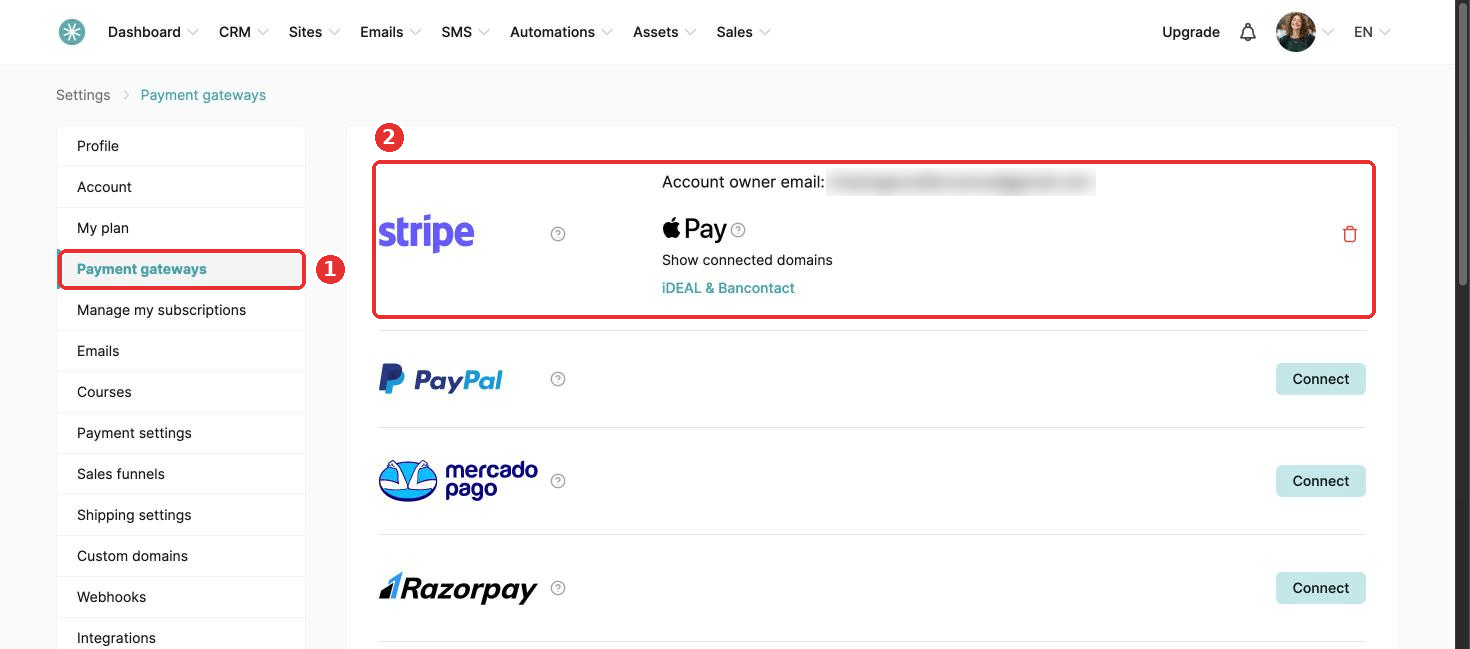
- Click Payment gateways, then Connect next to Stripe.
- Log in to Stripe, or create a new account.
- Choose the country where your business is registered and your business type: individual, company or nonprofit.
- Check your personal details. Stripe needs these to turn on payments.
- Click Authorize access to this account. You land back in SleepPRO™.
Once connected, Stripe shows at the top of your Payment gateways page with the email address of your Stripe account.
Your payment pages need the Email and First name fields for Stripe to work.
Payment methods and currencies
Card:
- Buyers: worldwide.
- Subscriptions: yes, in all 46 currencies.
- Currencies: AED, ALL, ARS, AUD, BRL, CAD, CHF, CLP, CNY, COP, CZK, DKK, EGP, EUR, GBP, HKD, HUF, IDR, ILS, INR, JPY, LKR, MAD, MXN, MYR, NGN, NOK, NZD, PEN, PHP, PLN, RON, RSD, RUB, SAR, SEK, SGD, THB, TRY, TWD, UAH, USD, VND, XAF, XOF and ZAR.
- Merchant restrictions: none.
Apple Pay:
- Buyers: worldwide, on supported Apple devices.
- Subscriptions: yes, through the saved card.
- Currencies: the same 46 as card.
- Not available for Stripe accounts registered in India.
iDEAL:
- Buyers: Netherlands.
- Subscriptions: yes, through a SEPA mandate. Turn on SEPA in Stripe.
- Currency: EUR only.
Bancontact:
- Buyers: Belgium.
- Subscriptions: yes, through a SEPA mandate. Turn on SEPA in Stripe.
- Currency: EUR only.
Klarna:
- Buyers: countries Klarna supports.
- Subscriptions: yes.
- Currency: must match your country, following Klarna's rules.
- Your Stripe account must be registered in a country Klarna supports.
Multibanco:
- Buyers: Portugal.
- Subscriptions: yes. Each billing cycle creates a payment voucher due within 10 days.
- Currency: EUR only.
A payment plan runs as a subscription with a set number of payments, and ends by itself after the last one. Stripe lists these plans as Subscriptions. This is expected.
Did this answer your question?